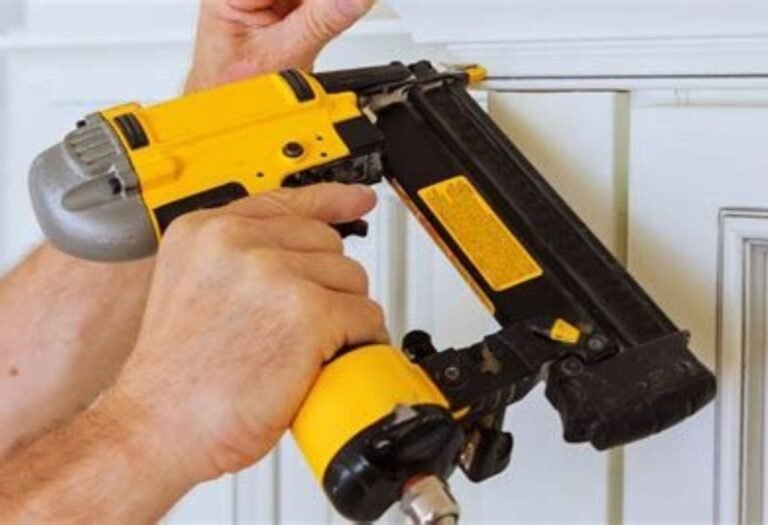
The Ultimate Guide How to Switch Firing Mode on Nail Gun
To change your nail gun’s firing mode, always prioritize safety by disconnecting the power source first. Then, locate the mode selector switch, typically found near the trigger, to confidently choose between sequential (single fire) for precision or contact (bump fire) for rapid, efficient work on diverse projects. Mastering this simple adjustment significantly enhances both user safety and project productivity.
Ever felt that surge of excitement, standing at the precipice of a new DIY project or a professional carpentry job, with your trusty nail gun in hand? It’s a powerful tool, capable of making quick work of daunting tasks. But hold on a second! Have you ever paused to consider its hidden potential, or perhaps, its inherent dangers if not used correctly? We’re talking about its firing modes – a crucial feature often overlooked, yet fundamental to both your safety and the quality of your work.
You see, most modern nail guns aren’t just simple point-and-shoot devices. They come equipped with different firing modes designed for various applications, offering a blend of speed, precision, and most importantly, safety. Understanding these modes and knowing how to switch firing mode on nail gun isn’t just about being a pro; it’s about being smart, safe, and efficient. Imagine trying to install delicate trim work with a setting meant for framing a house – that’s a recipe for disaster and wasted materials! So, let’s dive into the ultimate guide to mastering your nail gun’s versatility.
My goal here is to make sure you feel completely confident handling your nail gun, understanding its nuances, and knowing exactly how to switch firing mode on nail gun for any task. Think of me as your friendly guide, sharing insights that will not only improve your craftsmanship but also significantly boost your safety on the job site or in your home workshop. Let’s get started and unlock the full potential of your tool!
Key Takeaways
- Prioritize Safety: Always disconnect power source before adjusting firing mode.
- Identify Your Modes: Understand sequential for precision, contact for speed applications.
- Locate the Selector: Find the dedicated switch, dial, or button on your specific gun.
- Adjust Accurately: Follow manufacturer’s instructions for proper mode switching.
- Test New Setting: Verify the firing mode engages correctly and safely before use.
- Consult Your Manual: Specific models have unique switching procedures and details.
- Choose Wisely: Select the appropriate mode for project safety and efficiency.
📑 Table of Contents
Understanding Your Nail Gun’s Firing Modes
Before we even get to discussing how to switch firing mode on nail gun, it’s vital to understand what these modes actually are and what they do. Essentially, there are two primary firing mechanisms you’ll encounter on most nail guns. Knowing the difference is your first step to becoming a safer, more productive user.
Sequential (Single-Shot) Firing Mode
This mode is often called “single-shot” or “full sequential.” It’s the safest option and generally recommended for most tasks, especially when precision is key. In sequential mode, you must perform two distinct actions in a specific order to fire a nail:
- First, you press the contact trip (the nose of the gun) against the workpiece.
- Second, you pull the trigger.
Both actions must happen sequentially for the nail gun to fire. If you lift the gun off the wood and then press it down again, you’ll need to pull the trigger again for another nail. This greatly reduces the risk of accidental firing, making it ideal for delicate work like installing trim, siding, or any task where an accidental double-fire could ruin your material or cause injury. It gives you incredible control over each nail.
Contact (Bump Fire) Firing Mode
Also known as “bump fire” or “multi-shot,” this mode is all about speed for repetitive tasks. With contact firing mode, you can fire nails much faster because the sequence of actions is more flexible:
- You can hold the trigger down, and then simply bump or “contact” the nose of the gun against the workpiece to fire a nail.
- Alternatively, you can press the contact trip against the workpiece and then pull the trigger, and as long as the trigger remains held down, each subsequent bump against the material will fire a nail.
This mode is a real time-saver for large jobs like framing walls, decking, or roofing, where you need to drive many nails quickly. However, it also carries a higher risk of accidental discharge, so extreme caution and proper training are absolutely necessary. While it boosts efficiency, it requires heightened awareness.
Why Switching Firing Modes Matters: Safety and Efficiency
Understanding how to switch firing mode on nail gun isn’t just about knowing how to flip a switch; it’s about making deliberate choices that impact your safety, your project’s outcome, and your overall productivity. Let’s talk about why this simple act holds so much weight.
Prioritizing Safety
This is, without a doubt, the most critical reason. Imagine working on a ladder, trying to fasten a small piece of wood, and your nail gun accidentally fires a second nail because it was in bump fire mode. That unexpected recoil, the sudden movement, could easily lead to a fall or a misfired nail hitting something (or someone) it shouldn’t. Sequential mode is your best friend here. By requiring a deliberate trigger pull for each nail, it acts as a safeguard against accidental firing, minimizing the risk of injury to yourself or others. It’s a foundational aspect of responsible tool use, ensuring maximum safety.
Boosting Efficiency and Quality
While safety is paramount, efficiency also plays a huge role. For jobs requiring many nails in quick succession, like sheathing a roof or building a fence, contact firing mode is a game-changer. It allows for rapid fastening, significantly speeding up the process and increasing your productivity. However, for precision tasks such as installing crown molding or intricate trim, the speed of bump fire can be detrimental. A misplaced nail can split wood, create unsightly marks, or even damage your workpiece. In these scenarios, the deliberate, single-shot action of sequential mode ensures each nail is placed perfectly, leading to a much cleaner, higher-quality finish. It’s about having optimal control for the task at hand.
The Step-by-Step Guide: How to Switch Firing Mode on Nail Gun
Alright, you’re ready to put theory into practice! Learning how to switch firing mode on nail gun is usually straightforward, but it’s important to approach it systematically and safely. Remember, every nail gun model can be slightly different, so consider these steps as a general guide.
Locating the Selector Switch
The first step is to find the firing mode selector on your particular nail gun. This switch is typically located in one of a few common places:
- Near the trigger housing: Often a small lever or button close to where your hand grips the tool.
- On the side of the tool body: Sometimes on the main housing, easily accessible with your thumb.
- Near the magazine: Less common, but some models might integrate it here.
It’s designed to be easily accessible but not so exposed that it can be accidentally bumped. If you can’t find it, your user manual is your best friend!
Understanding the Markings
Once you’ve found the selector, you’ll usually see some visual cues indicating the current mode. Common markings include:
- Single nail icon: This almost always indicates sequential (single-shot) mode.
- Multiple nail icons (or a lightning bolt): This typically signifies contact (bump fire) mode.
These icons are universal and make it simple to understand which mode you’re in at a glance, helping you remember how to switch firing mode on nail gun.
The Switching Mechanism
Depending on your nail gun, the actual act of switching modes could involve one of these actions:
- Flipping a lever: Many models have a small lever that you simply flip from one position to another.
- Pushing a button: Some have a button that you push, often cycling through the modes with each press.
- Rotating a dial: Certain nail guns feature a rotary dial that you twist to align with your desired setting.
Always disconnect your nail gun from its power source (air hose or battery) before making any adjustments. This simple precaution ensures your safety while you learn how to switch firing mode on nail gun. Once disconnected, make the adjustment firmly but gently. You should feel or hear a click, indicating the mode has engaged.
Common Types of Firing Mode Selectors
While the overall function is the same, manufacturers use different designs for their firing mode selectors. Knowing these common types will help you quickly identify and learn how to switch firing mode on nail gun, regardless of the brand or model you’re using.
Lever-Style Selectors
This is probably the most common type you’ll encounter. It’s a small, often ribbed or textured lever that you simply push or pull to toggle between the modes. It usually has two distinct positions, one for sequential and one for contact. They’re straightforward, easy to operate even with gloves on, and give a clear tactile feedback when switched. Learning how to switch firing mode on nail gun with a lever is usually intuitive.
Button-Style Selectors
Some nail guns feature a push-button selector. You might need to press and hold it, or simply press it once to cycle through the available modes. These are often flush with the tool body, reducing the chance of accidental changes. The selected mode is typically indicated by an LED light or a visual display. If your nail gun uses buttons, understanding how to switch firing mode on nail gun involves a simple press.
Rotary Dial Selectors
Less common but still present on some models, particularly on more advanced nail guns, are rotary dials. These require you to twist a dial to align an indicator with the desired firing mode symbol. Dials offer a clear visual representation of the selected mode and can sometimes offer more than just two settings (though sequential and contact are the main two you’ll use). Mastering how to switch firing mode on nail gun with a dial is as simple as turning it.
No matter the type, always make sure the switch feels firmly engaged in your chosen mode before reconnecting power and beginning work. A loose selector could potentially switch modes unexpectedly.
Tips for Mastering Your Nail Gun’s Firing Modes
You’ve learned the basics of how to switch firing mode on nail gun. Now, let’s talk about some pro tips to help you truly master this powerful tool, ensuring safety, quality, and peak productivity on every project.
Always Consult Your Manual
I know, I know – who reads manuals? But seriously, your nail gun’s user manual is an invaluable resource. It will provide specific instructions on how to switch firing mode on nail gun for your exact model, along with crucial safety warnings and maintenance tips. Don’t skip it!
Practice Makes Perfect
Before you start on your actual project, grab some scrap wood. Practice switching between sequential and contact modes. Get a feel for how each mode operates, the sound it makes, and the rhythm required. This helps build muscle memory and confidence, ensuring you have control when it matters.
Regular Safety Checks
Before each use, and especially after learning how to switch firing mode on nail gun, perform a quick safety check. Ensure the contact trip is functioning correctly and that the selected firing mode is truly engaged. Disconnect the power source immediately if anything feels off.
Match the Mode to the Task
This is where the magic happens for efficiency and quality. For precise, delicate work like trim or decking face-nailing, always opt for sequential mode. For high-volume, less-critical tasks like framing or subflooring, contact mode can save you a lot of time. Making the right choice enhances both your productivity and the longevity of your tool.
Maintenance Matters
A well-maintained nail gun is a safe and efficient nail gun. Keep it clean, lubricated (if required for pneumatic models), and regularly inspect for wear and tear. Proper maintenance ensures the selector switch and all other mechanisms operate smoothly and reliably.
Conclusion
By now, you should feel much more confident about your nail gun’s capabilities and, crucially, about how to switch firing mode on nail gun. This isn’t just a technical detail; it’s a fundamental aspect of safe, efficient, and high-quality craftsmanship. Understanding the difference between sequential and contact firing modes, knowing when to use each, and being able to confidently switch between them empowers you as a user.
Remember, prioritizing safety is always paramount. Sequential mode offers that crucial layer of protection for precision work, while contact mode offers unmatched efficiency for high-volume tasks when used responsibly. Take the time to practice, read your manual, and always match your tool’s mode to the demands of your project. This small adjustment in your workflow will lead to greater control, increased productivity, and ultimately, more successful and satisfying results.
So, go forth with your newfound knowledge! You’re now equipped to handle your nail gun not just with power, but with precision and peace of mind. Happy nailing!
Frequently Asked Questions
How do I switch the firing mode on my nail gun?
Most nail guns feature a selector switch or dial, usually located near the trigger or magazine, that allows you to change the firing mode. You’ll typically find options for sequential and contact (bump) firing modes, which you can select by rotating the dial or flipping the switch to your desired setting.
What are the different firing modes available on nail guns?
Nail guns typically offer two primary firing modes: sequential (or single-shot) and contact (or bump-fire). Sequential mode requires you to press the tip against the surface and then pull the trigger for each nail, while contact mode allows you to hold the trigger down and fire a nail each time the tip contacts a surface.
Why is it important to switch between sequential and contact firing modes?
Switching firing modes is crucial for both safety and efficiency, depending on your task. Sequential mode is safer for precise work or when working around others, as it prevents accidental firing. Contact mode is ideal for fast, repetitive tasks like decking or framing, where speed is prioritized and there’s less risk of misfires.
Is it safe to switch the firing mode while my nail gun is loaded with nails?
For safety, it’s generally recommended to clear any nails and disconnect the air or battery source before attempting to switch the firing mode on your nail gun. While many tools are designed to allow mode changes while loaded, taking these precautions eliminates the risk of accidental discharge during the adjustment process.
My nail gun isn’t switching firing modes, what should I check?
If your nail gun isn’t switching firing modes, first ensure it’s clean and free of debris, as build-up can jam the selector mechanism. Also, check your tool’s manual for specific instructions, as some models may have a lock-out feature or require a specific sequence to change modes. If the issue persists, consider professional servicing.
Do all nail guns have the ability to switch firing modes?
No, not all nail guns are equipped with the ability to switch firing modes. Many entry-level or specialized nail guns may only offer a single firing mode (often sequential for safety reasons). Always check the specifications or user manual of your particular nail gun model to confirm its firing mode capabilities.

I’m Michael R. Turner, the founder, lead writer, and passionate DIY enthusiast behind 101diytools.com. With years of hands-on experience in home improvement and power tools, I built this platform to share practical tips, in-depth guides, and honest reviews to help DIYers of all skill levels tackle projects with confidence and the right tools.